by Jason Prahl | Feb 10, 2012 | Blog, Microsoft Exchange

After a report from a user that they were not able to get an email from someone I started poking into the exchange log files and quickly noticed multiple lines that read: 452 4.3.1 Insufficient system resources.
I checked memory, networking, CPU usage and finally hard drive space. All seemed fine though my C drive only had about 1.95gb free. I figured that didn’t sound like a lot but my mailbox databases are on a different drive that has 250gb free. After a bit of research I found that Exchange 2007’s mail queue folder is by default on the C drive and will start throwing these sort of errors if there is less than 4gb of space.
So, I decided to move the queue folder (which currently was about 500mb) to a different drive. I found the following command which easily moved the queue:
Move-TransportDatabase.ps1 -QueueDatabasePath: D:\Exchsrvr\TransportRoles\data\Queue -QueueDatabaseLoggingPath: D:\Exchsrvr\TransportRoles\data\Queue
Replace the D:\Exchsrvr…. with the path where you want the queue moved to.
The Move-TransportDatabase.ps1 script does the following:
- Free space is checked on the destination drive for the Queue Database and Queue Database Logs
- Create the destination path for the Queue Database and Queue Database Logs
- Assign Full Control permissions for Network Service, Local System, and Administrators for both paths
- Stop the Exchange Transport Service
- Backup the original EdgeTransport.exe.config file
- Move the Queue Database files, mail.que and trn.chk, to the destination folder
- Update the Queue Database path
- Move the file trn.log and any trn*.log files to the destination folder
- Update the path for Queue Database Logs
- Restart the Transport Service
Answer found on petri.co.il
by Jason Prahl | Feb 8, 2012 | Blog, Miscellaneous

I received the following comment spam on my post about the Asus Transformer Prime.
what bothers me is the sensitivity of the mouse on the keypad when you are typing on the dock. also the fact that is comes with windows 97. However i did download windows 2010 off of the android market and it works fine.
I understand the purpose of trying to post comments on blogs that have links to websites in order to inflate their search engine rankings, but it really is annoying. It’s sad that we have to come up with things like captcha and Akismet to try to block out these types of misuses of the internet.
Ok, enough complaining. I did however find the above comment pretty funny. “the sensitivity of the mouse on the keypad”??? What does that even mean? Windows 97? I must have missed that version. Windows 2010 must not have been very good because I’ve never heard of it. :) What’s even funnier than non-existent versions of Windows is the fact that they were able to download them from the Android market and install them on an Android tablet.
I guess if there weren’t such idiots who make bots to fill in nonsense comments on blogs then we wouldn’t have as much to laugh and complain about.
by Jason Prahl | Feb 7, 2012 | Blog, Microsoft Windows
After installing Internet Explorer 9 a welcome page pops up in a seperate tab the first time you run it. I ran into a machine where it kept popping up over and over.
To fix it:
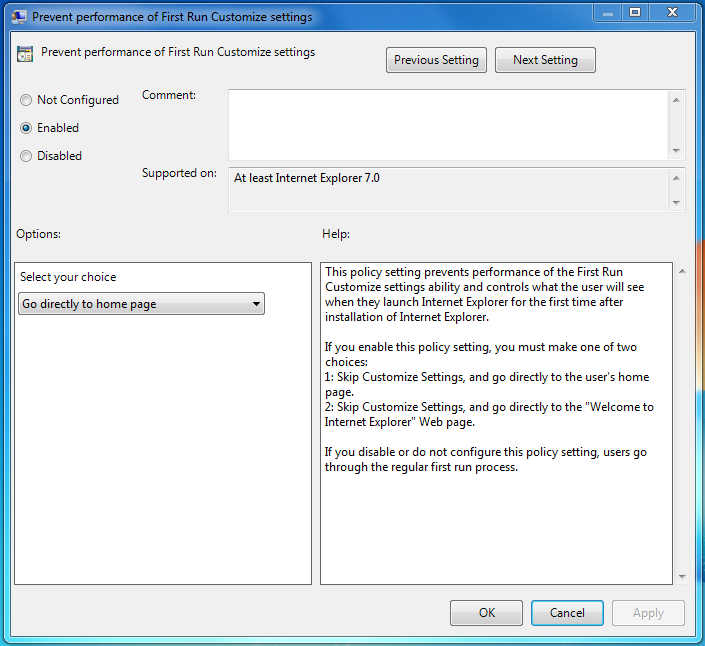
- Click start and in the search box type gpedit.msc
- In the Local Group Policy Editor navigate to:
User Configuration/Administrative Templates/Windows Components/Internet Explorer.
- Locate the “Prevent performance of First Run Customize settings” setting and double-click
- Click the “Enabled” setting and below that click the drop-down where it says “Select your choice.” Select “Go directly to home page.”
- Hit ok then close the group policy editor.
- Close and open Internet Explorer and you should be good.
by Jason Prahl | Feb 5, 2012 | Blog, Wallpaper

by Jason Prahl | Feb 4, 2012 | Blog, Wallpaper

by Jason Prahl | Feb 3, 2012 | Blog, Wallpaper

by Jason Prahl | Feb 2, 2012 | Blog, Wallpaper

Click image for 1920 x 1080 version.
You may use this image for personal use only.
Please contact me for business use.
by Jason Prahl | Feb 1, 2012 | Blog, Photo - Monochrome, Wallpaper

by Jason Prahl | Feb 1, 2012 | Blog, SQL Server

I use the instr function in VB all the time and wanted to do something similar in a SQL Server query.
I found that charindex(searchstring,searchfield) does the trick.
by Jason Prahl | Jan 31, 2012 | Blog, Miscellaneous

Found on Pintrest.com, original article: ApartmentTherapy.com